How to Install and Activate DeltaFlowPrint in NinjaTrader
Step 1: Download DeltaFlowPrint
Download the DeltaFlowPrint indicator from the link below:https://futuresflow.io/resources/deltaflowprint.22/
License Requirement
To use the Footprint chart, you need an Elite License.You can purchase an Elite license or start a free trial here:
https://futuresflow.io/account-types/
Step 2: Install the Indicator in NinjaTrader
After downloading the ZIP file:- Open NinjaTrader.
- Navigate to Tools → Import → NinjaScript Add-On.
- Select the downloaded ZIP file.
- Click Open and wait for the import process to complete.
If You See Any Errors
If NinjaTrader reports any import errors:- Extract the ZIP file.
- Copy the required DLL file.
- Paste it into:
Documents\NinjaTrader 8\bin\Custom - Restart NinjaTrader.
Step 3: Activate Your License
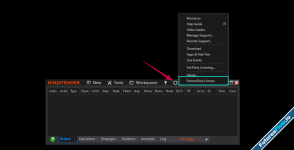
- In NinjaTrader, go to Help → FuturesFlow License.
- Retrieve your license key from:
https://futuresflow.io/account/license - Copy and paste the license key into the FuturesFlow License window.
- Click Activate.
Step 4: Add the Indicator to a Chart
- Open a chart in NinjaTrader.
- Right-click on the chart and select Indicators.
- Find DeltaFlowprint in the indicator list.
- Add it to the chart and configure the settings as needed.
- Click OK.